

A business system works best when people, information and tools fit together. Business systems implementation services turn that fit into practical steps, such as setting up a system, configuring workflows, preparing data and testing results. The goal is not automation for its own sake, but fewer manual hand-offs and a process the team can use consistently.
Implementation involves more than switching on software. Process decisions, data quality and how staff use the system all affect whether it works as intended.
This article explains what implementation services include, how they support business process automation and how data migration accuracy is checked. It also covers the factors that shape the work and what to consider when planning an implementation in South Africa.
Key Takeaways
- Implementation covers more than installing software: it aligns system setup with the processes and responsibilities the business needs to support.
- Data migration checks should compare source and destination records, investigate discrepancies and confirm key reports use the transferred information correctly.
- Automation works best when the underlying workflow is clear, with defined steps, hand-offs and exceptions before repetitive tasks are automated.
- In South Africa, implementation can range from a guided set-up to a broader system build, depending on the processes, data and team requirements.
Data migration accuracy and quality checks
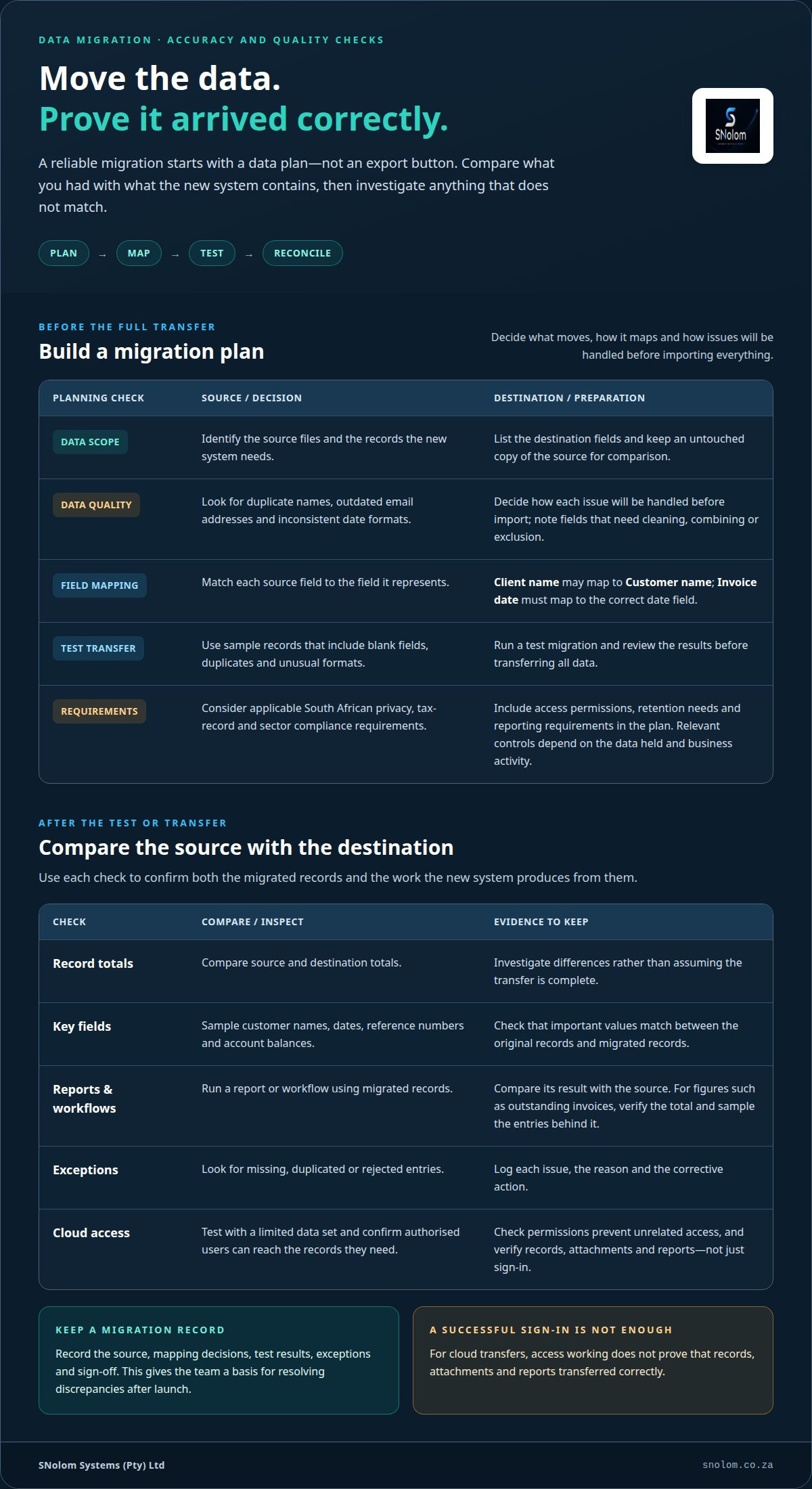
A reliable migration starts with a data plan, not an export button. Identify the source files, destination fields and records the new system needs. A customer spreadsheet, for example, may contain duplicate names, outdated email addresses or inconsistent date formats. Decide how to handle each issue before importing data, and keep an untouched copy of the source for comparison.
Next, map each source field to its destination. A “Client name” column might become “Customer name”, while “Invoice date” must map to the correct date field. Note which fields need cleaning, combining or exclusion. Run a test migration before transferring everything, using sample records with blank fields, duplicates and unusual formats.
Configure systems around applicable South African privacy, tax-record and sector compliance requirements. The relevant controls depend on the data held and the business activity. Include access permissions, retention needs and reporting requirements in the implementation plan so the system supports the organisation’s obligations.
- Reconcile records: compare source and destination totals, then investigate differences.
- Check key fields: sample customer names, dates, reference numbers and account balances.
- Test outputs: run a report or workflow using migrated records and compare its result with the source.
- Log exceptions: record missing, duplicated or rejected entries, the reason and the corrective action.
Cloud migration requires the same checks, with added attention to access and transfer arrangements. Confirm that authorised users can reach the records they need and that permissions prevent unrelated access. Test with a limited data set before moving all working data. A successful sign-in does not prove that records, attachments and reports transferred correctly.
Keep a migration record of the source, mapping decisions, test results, exceptions and sign-off. It gives the team a basis for resolving discrepancies after launch. Where figures inform decisions, such as outstanding invoices, verify the total and sample the underlying entries before relying on the new report.
What are Implementation Services?
Business systems implementation services make an application part of daily operations. The work can cover setup, configuration, data fields, user access, workflow rules and staff guidance. An ERP system may focus on stock, purchasing and finance records; a CRM may centre on customer details, sales stages and follow-up tasks. Specialist software also needs settings that support the process it is meant to manage.
Implementation involves decisions before and after configuration. A defined sequence helps control the work: map the current process, agree on the required result, configure the system, test real scenarios and prepare users. A project management tool can track decisions, responsibilities, dependencies and open issues. For example, a sales team can test how an enquiry moves from capture to assignment and follow-up. Installation alone does not show that the workflow is usable.
Software recommendations should start with the work, not a feature list. A business may need a clear record of customer requests, but not a complex CRM. Existing tools might be configurable to support the process. Custom software development is different: it builds software for a specific requirement. It may suit a genuine gap that standard configuration cannot address, but entails a separate build and maintenance commitment. A useful recommendation explains the fit, limits and trade-offs.
South African businesses can compare implementation providers and service packages by checking the stated scope, deliverables, migration approach, testing responsibilities and handover. Compare like with like: a package covering configuration differs from one that also maps processes and prepares users. Ask how decisions and exclusions are documented, and what evidence marks a task as complete. The clearest proposal connects each project step to a business need, such as reducing duplicate capture between an enquiry form and a sales register.
That comparison makes the next decision clearer: identify the process that needs support, then define the system changes and checks it requires.
Business process automation
Automation replaces repeatable manual steps with rules, triggers and system actions. A new enquiry, for example, can create a sales record, assign an owner and set a follow-up task. The system handles routine capture, while staff make decisions that require judgement. Start by mapping the current process, including hand-offs, delays and exceptions. Automating an unclear workflow can reproduce its problems faster.
Define the trigger and expected result before configuring a workflow. A completed order form might trigger an approval request, then create a fulfilment task after approval. Specify what happens when information is missing, an amount needs review or an approver is unavailable. Without these exception paths, work can stall silently or proceed with incomplete details.
- Capture: identify the event, such as a submitted enquiry or approved purchase request.
- Apply rules: set conditions, such as routing a request by product type or region.
- Assign action: create a task, update a register or notify the responsible person.
- Handle exceptions: flag missing details and route unusual cases for human review.
Test real scenarios, not just the ideal path. Use a standard enquiry, a duplicate record and a submission with missing information. Confirm that each task reaches the right owner, the record updates once and exceptions stay visible. A test log can capture the input, expected result and observed result. Fix any rule that fails before it affects live work.
Automation needs an operational owner. Assign someone to review rule changes, access and unresolved exceptions as processes evolve. Keep a simple record of each workflow’s trigger, conditions, actions and owner. If sales stages change, for example, follow-up rules may also need adjustment. This helps prevent outdated automation from assigning tasks according to old process logic.
Use records the system already produces, such as overdue tasks or incomplete submissions, to monitor the workflow. These indicators show where a rule or process needs attention. The aim is controlled, traceable work, not removing every human step.
What business systems implementation services are available in South Africa?
In South Africa, implementation can cover a complete system setup or a defined operational task. An ERP project may configure purchasing, stock and finance processes; a CRM project may organise customer records, sales stages and follow-ups. Other work can focus on data migration, reports, connected workflow steps or staff preparation. The right scope depends on the process that needs support.
For a smaller requirement, a guided start might focus on one working area, such as a sales register or management dashboard. A broader build can bring related records and routines into one structured system. Team implementation includes the people who use it: responsibilities, hand-offs and practical instructions must align with the configured process. These scopes are distinct, not interchangeable package labels.
- System setup: configure fields, access and records for an agreed process.
- Workflow automation: define triggers, actions and exceptions for repeatable tasks.
- Data and reporting: organise source information and build useful operational views.
- Team implementation: connect system use with roles, sales steps and hand-offs.
To compare business systems implementation services, match every proposed task to a business need. If staff re-enter the same enquiry in separate records, for example, the scope should address capture and ownership. If managers cannot see overdue work, reporting requirements should define the fields and status updates needed for that view. A clear scope also records deliverables, testing, handover and exclusions, making project proposals easier to compare.
Choose the smallest scope that resolves the operational issue without leaving essential steps disconnected. A single workflow may be enough when records and responsibilities are already clear. Several linked processes may need a wider build. Define the process, information and users involved before setting the boundary. To map those requirements into a practical system scope, outline your business system requirements.
SNolom Systems (Pty) Ltd: Business System Build
SNolom Systems (Pty) Ltd builds practical systems around how teams work, instead of adding another disconnected spreadsheet. A Business System Build can bring records, workflows and reporting into a structured Excel-based system. For a narrower starting point, Guided Quick-Start establishes a defined working area. Workflow & Automation Build focuses on repeatable steps, while Team / Sales Implementation addresses how people use the system in daily work.
These services can suit teams dealing with manual hand-offs, scattered information or unclear sales processes. SNolom shows the price before building and confirms the final scope in writing before payment. Contact SNolom Systems (Pty) Ltd to discuss the process your system needs to support.
Set a clear starting point for implementation
A system needs an owner and a defined purpose after launch. Before work begins, decide which operational process should become easier to manage and who will use the system each day. This gives implementation a practical reference point, rather than treating completion as simply switching on software.
The right starting scope depends on the work involved. Guided Quick-Start establishes a focused starting point. Workflow & Automation Build addresses repeatable process steps, while Data & Reporting Setup supports organised information and useful reporting. These are practical routes within business systems implementation services, selected to fit the business need.
Make the first decision specific: name the process, the people involved and the information they rely on. A sales hand-off may need clearer ownership; a reporting task may need better-structured data. A defined starting point makes the project conversation more useful.
If you’re ready to discuss a suitable scope, contact SNolom Systems (Pty) Ltd. A measured first step can make the work ahead clearer and easier to plan.
Frequently Asked Questions
Which business systems do implementation providers support, such as ERP, CRM, HR, and accounting software?
The relevant system experience depends on the product and the work required. ERP can bring finance, stock and purchasing records together; CRM organises customer and sales information. HR tools manage employee processes, while accounting software records financial transactions. An Excel-based operating system may instead focus on structured records, reports and workflow automation. Identify the system in use and the task it needs to handle.
What factors affect the cost and timeline of a business systems implementation?
Scope, data condition, workflow complexity, integrations and staff involvement all affect cost and timing. A clean spreadsheet used by one team is a different project from several disconnected sources feeding shared reports. The price depends on the agreed case and is provided after a quote request; key cost factors include deliverables, data preparation and configuration. Timing also depends on decision-making, access to source information and time for testing.
What are the steps in a business systems implementation project?
A project usually moves from requirements and process decisions to configuration, testing, user preparation and handover. Define acceptance criteria before building. For example, a sales record might need to show an owner, status and next action. Test this with representative cases, including incomplete information. Record approved changes and open issues, then assign an operational owner to manage routine system decisions after handover.
How should businesses assess requirements and choose the right system before implementation?
Start with the work outcome, not a list of software features. Describe who needs information, what decision they make and what currently slows the task. A manager may need to identify sales enquiries without a next action, for example. Separate essential requirements from preferences, then consider whether existing tools can meet them. This helps avoid adopting a wider system when a focused process change or better-structured record would address the gap.
What risks commonly cause business systems implementations to fail, and how can they be mitigated?
Common risks include unclear ownership, poor source data, excessive scope and rules that do not match actual work. A system can be configured correctly yet still frustrate users if its fields or responsibilities conflict with daily practice. Reduce these risks by assigning decision owners, documenting process exceptions and testing realistic scenarios with intended users. Keep a change log so new requests are assessed against the agreed purpose, not added informally.
What training, migration, integration, and ongoing support are included in implementation services?
Project elements vary, so the written scope should state what is included. Training may cover routine tasks, such as updating a customer record; migration may address selected source data; integration may connect defined systems or workflows. Handover can include operating instructions and known limitations. Consider ongoing support separately: specify whether post-launch assistance or future changes are part of the engagement, rather than assuming they are included.

